


DoorDash: Food, Grocery, More
4.7711.24K Reviews
App Specs
- Version
- 15.298.4
- Updated On
- License
- Free
- Downloads
- 50,000,000+
- Developer
- DoorDash
- Categories
- Food & Drink
- Platform
- Android, iOS
Screenshots
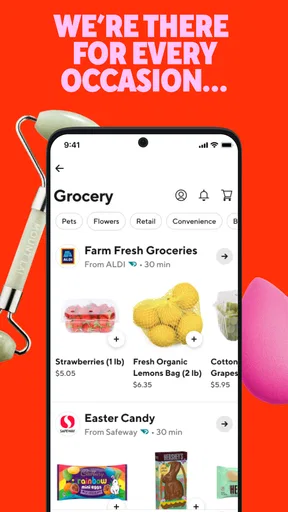
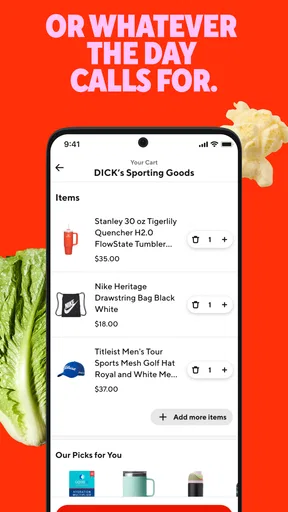
 Analysis by AppCompare
What I like most about DoorDash is how it brings a few useful errands into one place: a meal, a grocery top-up, or a household essential can all start from the same app. That convenience is real, but it is not the same as getting the lowest price or the broadest choice in every neighborhood. I’d recommend it most to people who value saving time and want a simple way to browse nearby options; anyone who enjoys comparing store prices or can easily pick things up themselves may prefer another route.
A useful way to handle the small, time-sensitive shop
The app makes most sense to me when the task is specific rather than ambitious. If I need a few ingredients for tonight, a forgotten household item, or dinner without interrupting work, ordering through one interface can be easier than checking separate restaurant and retailer apps. For a full weekly grocery shop, I’d still compare the available selection and total cost with my usual supermarket routine before committing.
A realistic example: I’m wrapping up a workday, have pasta at home, but realize I’m missing a couple of ingredients and don’t want to make another stop. I can look at grocery options, check whether the items I need appear available, and decide whether the time saved is worth the delivered total. If the basket is incomplete or the choices don’t suit the recipe, I can change plans instead of assuming delivery will solve everything.
That last check matters. Delivery apps can make browsing feel effortless, but an appealing list of shops does not guarantee that every item I want is available or that the final basket will match my plan. I find it more practical to decide on a flexible meal, then choose from what is actually offered, rather than build a rigid recipe around a hoped-for delivery.
How I’d use the filters and order details
Filters are most helpful when I use them to reduce a crowded choice, not to make the decision for me. Dietary preferences and delivery timing can narrow the list, but I’d still open the restaurant or store details and check the items, portions, and options carefully. A filter can make discovery faster; it cannot tell me whether a dish is right for my appetite or whether a grocery substitute will work for dinner.
For food orders, I’d review the cart before placing it, especially when customizing a meal or ordering for more than one person. That small pause helps catch mismatched choices and makes it easier to confirm that everyone’s needs are represented. For groceries, I’d keep the list concise and choose ingredients that can tolerate a little flexibility. This is a better fit for a quick top-up than for a precise shopping list where every brand or variety matters.
Tracking is useful for planning around a delivery, but I treat an estimate as a guide rather than a promise. If I have a meeting, a train to catch, or a meal that must be ready at an exact time, I would not build the whole schedule around an app estimate. When timing is flexible, seeing an order progress can reduce guesswork; when timing is critical, collecting the food myself or making another plan may be safer.
Worth Reading Before You Choose

Flipboard Shows What News Apps Must Do Beyond the Feed

Switching to Android Auto Means Rethinking Your Driving Routine

Google Calendar Makes a Crowded Week Easier to Manage

Ludo King Makes the Most of the Minutes Between Plans

Baby Panda World Brings Quick Play to Modern Phones, but Its Game Library Feels Busy

ESPN’s Live Game View Makes Following Close Games Easier
Convenience has a price, and the total deserves a look
I would compare the checkout total with the cost of collecting the same order, not just the menu or shelf prices I first saw. Delivery is valuable when it saves a trip, avoids a disruption, or makes an otherwise difficult errand manageable. If I’m already near the shop, though, that convenience may not be worth the extra expense. The right choice depends on the value of my time that day, not on a blanket claim that delivery is always a bargain.
Promotions can make an order more appealing, but I would treat them as a bonus rather than a reason to buy things I didn’t need. Before confirming, I’d check the final amount and make sure the basket still makes sense without being distracted by a discount. A small, necessary order can be worthwhile; adding unwanted items just to make an offer feel useful defeats the point of saving money.
Compared with calling a restaurant directly, DoorDash gives me a visual way to browse and place different kinds of orders, which is handy when I’m still deciding what sounds good. A restaurant’s own ordering option may be preferable if I already know exactly what I want or want to deal directly with that business. For groceries, shopping in person gives me control over substitutions and the chance to inspect produce, while the app trades that control for convenience. I see these options as complementary rather than assuming one should replace the others.
Who gets the most from it—and who may not
I can see this being especially useful for people with packed days, people who are homebound temporarily, or anyone coordinating food for a household with different schedules. It also suits indecisive evenings: browsing nearby meals can be easier than opening a stack of restaurant sites. The app is less compelling for someone who shops mainly by comparing unit prices, wants to choose every fresh item personally, or lives somewhere with limited participating options.
It is also worth thinking about the kind of order before opening the app. A prepared meal or a few essentials are natural fits for on-demand delivery. A large, carefully planned shop may require more attention to availability and the final basket than a quick browse suggests. If I need a particular ingredient for a recipe with no substitute, I would check the options first or choose a store visit instead of counting on a match.
DoorDash is a free Food & Drink app from DoorDash, and its broad mix of food, groceries, and retail essentials is the main reason I’d keep it available. The current version is 15.254.19, and it requires Android 8.0 or later. It is rated for Everyone, which makes its general audience broad, though the usefulness of ordering still depends on local selection and whether delivery fits a person’s budget and routine.
The app has an average rating of 4.7 from around 5.7 million ratings, with about 684,000 written reviews and over 50 million installs. Those figures suggest it is widely used, but popularity would not settle my own decision: I’d still judge it by the options and checkout total I see for my location. DoorDash was released on March 26, 2015, and its staying power is easier to understand once I see it as a practical shortcut for several everyday errands rather than only a restaurant directory.
Ever found yourself in that awkward moment when your fridge is emptier than your social calendar? Yeah, me too. Enter DoorDash: Food, Grocery, More, the app that's here to save the day—or at least your dinner plans. I decided to give it a whirl and here's my take.
What's the Deal with DoorDash?
So, here's the lowdown. DoorDash is like having a magic carpet ride for your cravings. Whether it's a late-night taco binge or a full-on grocery haul, this app has your back. I was genuinely surprised by the sheer variety of options available. From local joints to big-chain faves, it's all there.
Interface and User Experience
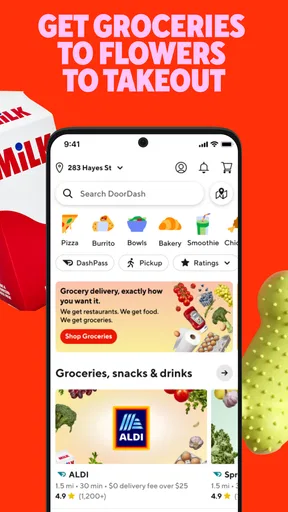
First things first, let's talk about the user interface. It’s clean, intuitive, and doesn’t make my brain hurt. The main menu is straightforward, allowing you to easily toggle between food delivery, groceries, and more. I especially appreciated the filter options which let me narrow down choices based on dietary preferences and delivery times. Simple but effective.
Delivery: Fast and Reliable?
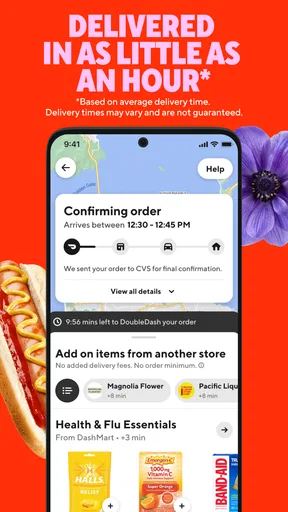
Now, what's the delivery scene like? I ordered a pizza and some household essentials to test it out. The app keeps you updated with real-time tracking, so you know exactly when to expect your goodies. My delivery was right on time, which was a pleasant surprise. The driver was friendly and adhered to all safety protocols. Kudos for that!
Pricing and Payment
Of course, we need to address the elephant in the room—pricing. While DoorDash isn’t the cheapest option out there, it offers solid value for the convenience it provides. I found the pricing transparent with no hidden fees. Plus, there are often promotions and discounts for first-time users or bulk orders, so keep an eye out for those!
Final Thoughts
All in all, if you’re looking for an app that’s got everything from sushi to salad, DoorDash: Food, Grocery, More is a strong contender. It brings a whole new meaning to having the world at your fingertips. Sure, it might not replace your weekly trip to the supermarket, but for those days when leaving the house is just not an option, it’s a lifesaver.
So, next time you're stuck in a food rut or just too comfy in your PJs to venture out, give DoorDash a shot. Who knows, it might just become your new best friend!
Pros
- Wide variety of restaurants and cuisines.
- User-friendly interface for easy navigation.
- Real-time tracking of your order.
- Flexible payment options available.
- Frequent promotions and discounts.
Cons
- Occasional delivery delays in peak times.
- Service fees can add up quickly.
- Limited availability in rural areas.
- Inconsistent customer support experience.
- Some restaurants have higher menu prices.
FAQs for DoorDash: Food, Grocery, More
What can I order through DoorDash?
DoorDash offers a wide variety of options for delivery, including meals from local restaurants, groceries, and even items from convenience stores. Users can browse diverse categories and cuisines, ensuring that there is something for everyone's taste. Additionally, DoorDash provides the option to schedule orders ahead of time.
Is DoorDash available in my area?
DoorDash operates in many cities across the United States, Canada, and Australia. To check availability in your area, simply download the app and enter your address. The app will display available restaurants and stores near you, ensuring that you have access to all the services offered.
How does DoorDash ensure the quality of the delivery?
DoorDash employs a network of vetted delivery personnel known as Dashers. They are trained to handle orders with care and efficiency. The app also features customer reviews and ratings for both Dashers and restaurants, helping maintain a high standard of service and reliability.
What payment methods does DoorDash accept?
DoorDash offers a variety of payment options to ensure convenience for users. Accepted methods include major credit and debit cards, PayPal, and DoorDash gift cards. The app also supports digital wallets like Apple Pay and Google Pay, making the checkout process quick and seamless.
What are the fees associated with DoorDash orders?
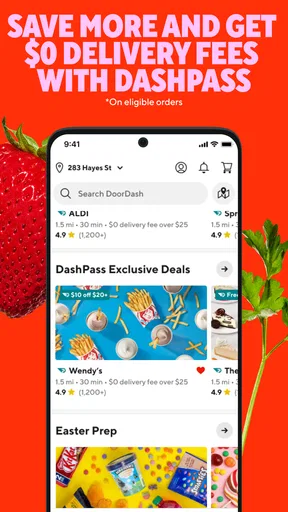
DoorDash charges a delivery fee that varies based on location and demand. There may also be service fees and optional tips for Dashers. Users can see a breakdown of all applicable fees before confirming their order. DoorDash also offers a subscription service, DashPass, which provides reduced fees on eligible orders.


